
If your UK side hustle earned more than £1,000 gross in the 2025/26 tax year or is on track to in 2026/27, you need to declare it to HMRC through Self Assessment.
Not doing so is not an oversight HMRC will overlook. Since January 2026, platforms including Etsy, Vinted, eBay, Deliveroo and Airbnb have been automatically sending seller earnings data directly to HMRC. The question is no longer whether they will find out. It is whether you told them first.
This guide takes you through the entire process in the correct sequence, from checking whether you need to register, through the registration itself, to completing and filing your first return. It covers both the 2025/26 tax year (filing deadline: 31 January 2027) and the 2026/27 tax year (deadline: 31 January 2028).
Do You Actually Need to Declare It?
Before doing anything, confirm you are past the threshold. Many people assume they are in when they are not, and vice versa.
You need to declare if:
Your total gross trading income, the total amount paid to you before any fees, expenses, or deductions, exceeded £1,000 across all your side hustles combined in the tax year.
You do not need to declare if:
Your total gross trading income was £1,000 or below. The £1,000 trading allowance means you owe no tax and have no reporting obligation. Keep records in case HMRC ever queries them.
Common Confusion — Gross vs Net
Gross income is what customers paid you, not what you received after platform fees. If Etsy customers paid £1,150 for your products, your gross income is £1,150 even if Etsy paid you £950 after deducting listing and transaction fees. The threshold is measured on gross income.
Not Sure? Use HMRC’s Own Checker
HMRC’s Help for Hustles campaign includes a free, anonymous online checker at gov.uk. It asks a series of questions about your activity and tells you whether it counts as trading. Take 5 minutes to run through it if you are in any doubt, it is worth doing before reading further.
Key dates you must not miss:
These are the dates that matter for the 2025/26 and 2026/27 tax years. Write them in your calendar now.
| Event | 2025/26 Tax Year | 2026/27 Tax Year |
| Register for Self Assessment deadline | 5 October 2026 | 5 October 2027 |
| Paper return filing deadline | 31 October 2026 | 31 October 2027 |
| Online return filing deadline | 31 January 2027 | 31 January 2028 |
| Pay tax owed deadline | 31 January 2027 | 31 January 2028 |
| Second payment on account (if applicable) | 31 July 2027 | 31 July 2028 |
The most important dates for most side hustlers: 5 October (register) and 31 January (file and pay). Missing either triggers penalties. Note that you can file anytime between the end of the tax year and the January deadline. Filing early in April, May, or June removes all deadline pressure.
Step 1 — Register for Self-assessment
WHO THIS APPLIES TO: Anyone whose gross side hustle income exceeded £1,000 in the tax year and who has not previously been registered for Self Assessment.
If you were previously registered (for example, when you were self-employed in a past job and have since become employed), you may already have a UTR. In that case, skip to Step 2.
How to Register?
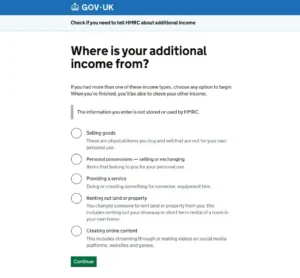
Go to gov.uk/register-for-self-assessment.
You will be asked to select the reason you are registering. Select “Working for yourself” or “I am self-employed as a sole trader.”
You will need:
- Your National Insurance number
- Your date of birth and home address
- An email address
- Your business start date (the date you first received any trading income, even if it was informal)
- A brief description of what you do (e.g., “selling handmade goods online”, “dog walking”, “freelance writing”)
You do not need a formal business name. Trading under your own name is perfectly acceptable.
If you already have a Government Gateway account for personal tax purposes, sign in with those credentials. If not, you will create one as part of the process, you need an email address and will go through an identity verification step.
The Identity Verification Step
HMRC has tightened its identity verification process. You will typically need to verify using either:
- A valid UK passport or driving licence and a recent bank statement or payslip, or
- Details from an existing tax credit claim or PAYE coding notice
If the automated check does not work the first time (this is more common than it should be), a fallback route is available using your P60, payslip, or previous HMRC correspondence. Do not be discouraged by a failed first attempt; it happens to a significant proportion of first-time registrants.
How Long It Takes?
Registration itself takes 10–15 minutes online. Once submitted, HMRC processes your registration and posts your Unique Taxpayer Reference (UTR) by second-class post to your registered address. This typically arrives within 10–14 working days, though some people report up to 21 days.
This is why registering early matters. If you wait until late September and your UTR is delayed in the post, you may technically miss the 5 October deadline without any way to speed it up.
Step 2 — Receive and Activate Your UTR
Your UTR is a 10-digit reference number unique to you. It looks like this: 1234567890 (ten digits, no letters). It is on the letter HMRC sends you and on any previous Self Assessment correspondence you have received.
Once Your UTR Arrives
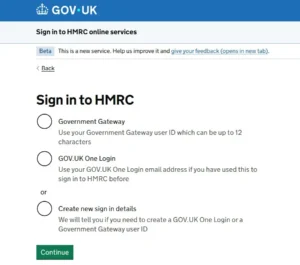
Sign into your Government Gateway account. Add Self Assessment to your account if it is not already there (you may need to enter your UTR to activate it). HMRC will send an activation code by post, which is separate from the UTR letter. Enter the code when prompted. This second code typically arrives within 7 days.
Allow 20–25 working days in total from registration to having a fully functional Self Assessment account ready to file from.
Keep Your UTR Safe
Your UTR is your permanent identifier for Self Assessment. You will use it every year. Store it somewhere you can find it in January — the Government Gateway dashboard, your accounting records, or a secure notes app. HMRC will ask for it every time you contact them.
Step 3 — Gather Your Records
You cannot file accurately without these. The earlier you pull them together, the fewer panicked hours you will spend in January.
Income Records
Total gross income from each source.
Most platforms make this straightforward:
Etsy: Seller dashboard → Finances → Payment Account → download a CSV or view the annual summary.
eBay: Seller Hub → Performance → Sales reports.
Vinted: Wallet → Transaction history → filter by date range.
Amazon: Seller Central → Reports → Business Reports.
Deliveroo / Uber Eats / Just Eat: Earnings section in the driver app or download the annual earnings statement from the app or web portal.
Amazon Flex: Earnings tab in the app shows weekly and monthly breakdowns.
PayPal / Stripe: Statements section → filter by your tax year dates (6 April to 5 April).
Bank account: For cash or BACS payments, a simple spreadsheet of income received works well to keep it updated monthly, not retrospectively.
For any income not on a platform, go through your bank statements line by line and identify every payment related to the hustle. Yes, all of them. HMRC can and does check.
Expense Records
If you are claiming actual expenses rather than the trading allowance, you need receipts or equivalent records for everything you are claiming.
This includes:
- Receipts for materials and stock (even photographed receipts via an app count)
- Platform fee statements (downloaded from each platform)
- Software subscription invoices
- Mileage log (date, from, to, purpose, distance) can be a simple spreadsheet
- Bank statements showing payments for business expenses
The trading allowance (Option A) requires no expense records; only your total gross income figure. If your actual expenses are under £1,000, use the allowance and skip the receipt-gathering.
Employment Income Details
If you also have a job, you will need your P60 (issued by your employer after the tax year ends, typically in May or June). Your employer’s PAYE income and the tax already deducted go on the return alongside your self-employment income.
Step 4 — Choose Your Expense Method
Before filling in the return, decide which method you are using. You cannot change this after you file, and you cannot combine both in the same tax year for the same activity.
Option a — Trading Allowance (Simpler)
Claim a flat £1,000 deduction from your gross income. Requires no receipts. Taxable profit = gross income minus £1,000.
Use this if your actual business expenses were less than £1,000, or if you want a simpler calculation and the difference is small.
Option B — Actual Expenses (Potentially Better)
Claim your real, allowable expenses. Taxable profit = gross income minus total claimed expenses. Requires records and receipts.
Use this if your actual expenses exceeded £1,000, for example, if you spent heavily on materials, tools, software, or mileage.
Which to Choose — the Quick Check
Add up your actual expenses. If they are less than £1,000: use Option A (trading allowance). If they are more than £1,000: run the numbers both ways and use whichever gives a lower taxable profit. If you are unsure and the difference is small, Option A saves admin.
Step 5 — Complete the Self Assessment Return
Log into your Government Gateway account. Go to the Self Assessment section. Select “Complete your 2025 to 2026 tax return” (once the return is open, typically from April or May 2026).
The return is divided into sections.
The key ones for side hustlers:
Employment Income
Enter the figures from your P60 here if you are also employed. Your employer will have already submitted these to HMRC via Real Time Information, so the boxes may be pre-filled, but check them.
Self-employment Pages (SA103 Short or SA103F Full)
This is where your side hustle income goes.
You will be asked:
Business name: Your trading name (or your own name if you trade as yourself).
Business description: A brief description of what you do.
Accounting period: This is always 6 April to 5 April for cash-basis accounting, which is what almost all side hustlers use.
Turnover: Your total gross income for the year.
Allowable expenses (if using Option B): Enter your total expenses in the appropriate boxes (cost of goods, travel, office costs, etc.).
Or trading income allowance (if using Option A): Tick the box to claim the £1,000 trading allowance.
Net profit: The return calculates this automatically once you enter income and either expenses or the allowance.
Completing the REST of the Return
The return will also ask about any other income (savings interest, rental income, pension income, etc.) and pull together your overall tax calculation. Most side hustlers with a standard employed + hustle setup will find this straightforward. The complexity only increases if you have multiple income types.
Save as You Go
The return saves automatically at each page, but it is good practice to click Save at regular intervals. The return does not submit until you reach the final declaration screen and actively click Submit. You can return to it multiple times before submitting.
Review the Calculation Before Submitting
Before you click Submit, HMRC shows you a tax calculation summary.
This shows:
- Your total income from all sources
- Your personal allowance
- Your taxable income
- Income tax owed
- National Insurance owed
- Any tax already paid (via PAYE)
- The balance you owe (or any repayment due)
Check this carefully. If the number seems wrong, either much higher or much lower than you expected, go back and check each income entry before submitting.
[SCREENSHOT OPPORTUNITY: Show the tax calculation summary screen, blur any personal numbers, keep the structure]
Step 6 — Pay What You Owe
The tax and NIC owed for the 2025/26 tax year is due by 31 January 2027. The payment and the filing deadline are the same date, but they are separate actions. Filing does not pay the tax.
How to Pay?
Bank transfer (BACS): The most reliable method. HMRC’s bank details are shown on the return summary. Use your UTR as the payment reference. Allow 3 working days to clear.
Debit card via HMRC’s website: Instant processing. Go to gov.uk/pay-self-assessment-tax-bill.
Direct Debit: You can set up a budget payment plan in advance through Government Gateway useful if you want to spread the cost throughout the year.
Do not pay by personal cheque unless you have no other option it takes longer to process and creates a paper trail that can cause issues if it arrives after the deadline.
Payments on Account
If your Self Assessment tax bill exceeds £1,000 and less than 80% of your total income was taxed at source (PAYE), HMRC requires you to make advance “payments on account” for the following tax year.
This catches many first-time filers off guard in January. Instead of paying just the current year’s tax, they also pay 50% of the estimated next year’s tax, effectively paying 150% of one year’s bill in a single January.
Example: Your 2025/26 side hustle tax bill is £1,200. At the January 2027 deadline, you would pay:
- £1,200 (2025/26 balancing payment)
- £600 (first payment on account for 2026/27, due 31 January 2027)
- Plus a second payment on account of £600 due 31 July 2027
Total January payment: £1,800, not £1,200.
Set aside money for this from the start. The first year is the hardest because there is no warning.
What to Do if You Are Late?
Late Registration (After 5 October)
If you have missed the 5 October registration deadline for 2025/26, register immediately, do not wait for the next deadline to come around. Late registration triggers a potential “failure to notify” penalty, but HMRC considers your compliance behaviour when calculating it. The sooner you register after missing the deadline, the lower the likely penalty.
If you come forward voluntarily before HMRC contacts you, the penalty is typically far lower than if they open a compliance check first.
Late Filing (After 31 January)
Day 1 late: Automatic £100 penalty.
3 months late: £10/day for up to 90 days (£900 additional).
6 months late: Additional 5% of tax owed or £300, whichever is higher.
12 months late: Further 5% of tax owed or £300.
The penalties compound quickly. If you miss the January deadline, file as soon as possible after it; every day you delay adds to the potential bill.
Late Payment (After 31 January)
Unpaid tax accrues interest at HMRC’s current rate (currently 7.25% per year as of early 2026; this changes periodically, usually tied to the Bank of England base rate plus 2.5%). Additionally, surcharges apply at 30 days, 6 months, and 12 months late.
If you cannot pay the full amount, contact HMRC before the deadline to set up a Time to Pay arrangement. HMRC are generally willing to spread payments if contacted proactively. Do not simply ignore the bill.
What if Hmrc Has Already Sent You a Letter?
If you have received a letter from HMRC about undeclared income before you have registered, this shifts the situation from voluntary disclosure to prompted disclosure. The penalty calculation becomes less favourable, but you should still respond and cooperate immediately. The penalties for cooperating after a prompted disclosure are still significantly lower than those for deliberate non-compliance.
What Happens if a Platform Has Already Reported You?

Since January 2025, digital platforms report seller earnings to HMRC for anyone who meets either of these thresholds in a calendar year:
- 30 or more transactions, or
- Total sales of approximately £1,700 or more (€2,000 at the applicable exchange rate)
If you met either threshold on Etsy, Vinted, eBay, Deliveroo, Airbnb, Uber, Amazon or similar in 2025, HMRC has your earnings data. The reports cover the 2025 calendar year and were submitted in January 2026.
What HMRC Does With the Data?
HMRC cross-references platform reports against Self Assessment records. If a platform has reported you but you have not filed a return, you may receive a “nudge letter” prompting you to check whether you need to register. These are not penalties — they are prompts. But they do indicate HMRC has data on you.
The Right Response if You Get a Nudge Letter
Do not panic. Do not ignore it. Register for Self Assessment if you have not already done so, gather your records, and file a return. If you owe tax, pay it. Acting promptly on a nudge letter is treated as voluntary cooperation, which minimises any penalty.
Frequently Asked Questions
Can I file a Self Assessment return myself or do I need an accountant?
Most side hustlers with straightforward income — one hustle, no employees, no VAT, no property income — can file entirely themselves using HMRC’s online system. The process is more intuitive than its reputation suggests. For 2025/26 returns, consider filing yourself first. If your income has grown significantly or you have multiple income types, an accountant (typically £200–£500 for a basic sole trader return) is worth considering from year two.
What if I made a loss on my side hustle?
A loss means allowable expenses exceeded trading income. You still need to file a return if gross income exceeded £1,000. The loss can typically be carried forward to reduce taxable profit in future years, or in some circumstances, offset against employment income. The rules are specific — if your loss is significant, take advice.
Do I need to file if I earned over £1,000 but owe no tax?
Yes. The obligation to file arises from crossing the gross income threshold, not from owing tax. A zero tax bill does not remove the filing requirement. Failing to file when required still results in the automatic £100 late-filing penalty.
What is the difference between registering for Self Assessment and registering as self-employed?
They are two names for the same process when you are a sole trader. When you register for Self Assessment as a self-employed person, HMRC registers you for both at once. You do not need separate registrations.
Can I deregister from Self Assessment if my side hustle income falls below £1,000?
Yes. If you stop trading or your gross income falls and stays below £1,000, you can ask HMRC to take you out of Self Assessment. You do this by contacting HMRC directly (via the helpline or your online account). HMRC may ask for evidence that the income has genuinely stopped or reduced. Do not simply stop filing — notify HMRC formally and get written confirmation.
WHAT TO READ NEXT?
If you have not yet checked whether your income crosses the threshold, read our guide to How Much You Can Earn From a Side Hustle Before Paying Tax (UK 2026) first.
For the full picture of what tax you will owe once you file — including worked examples with NICs, expenses, and payment on account — see the complete UK side hustle tax guide.
For what expenses you can and cannot claim to reduce your tax bill, see our guide to Allowable Side Hustle Expenses in the UK (2026 Full List).

More in Tax, Legal & HMRC

How Much Can You Earn From a Side Hustle Before Paying Tax? (UK 2026)
The short answer: £1,000 gross per tax year – not per month, not per hustle, and not your profit. Your total sales before any deductions. That is the UK’s trading allowance for 2026, and it is the most important number in UK side hustle tax. But the way it is worded in most online articles […]